For http://wizzworld.fr/ I need to program WebSocket on Iphone , with of course GWT!!!
Here is the solution :
1) do as my tutorial about GWTRaphael : clean the project as i said.
2) download GWTPhoneGap http://code.google.com/p/gwt-phonegap/ and http://code.google.com/p/gwt-ws/
3) Rigth on the project, Build Path->configure Build Path add add the donwloaded two JARs.
That's near finish,now we can do some code. The example of gwt-ws is not good,so i give you mine :
if (!JavaScriptWebSocket.IsSupported())
return;
String webSocketURL ="ws://your.url/websocket";
WebSocket webSocketConnection = new JavaScriptWebSocketFactory().createWebSocket(webSocketURL, new WebSocketCallback() {
@Override
public void onOpen(WebSocket webSocket) {
webSocket.send("Hello World"); }
@Override
public void onMessage(WebSocket webSocket, String message) {
Window.alert(message); }
@Override
public void onError(WebSocket webSocket) {
}
@Override
public void onClose(WebSocket webSocket) {
} });
That's all for now, next time we will see how to use phonegap on Iphone&android.
WebSocket on IPhone with GWT-WS

GWT and GWT4Raphael
Tutorial for install
GWT&GWTRaphael :
1) WHY ?
For begin, the why : use
GWT if you need fast Javascript and fast develop with modern feature
( i.e.
type checking,
refactoring, etc), And use Raphael for have really easy and nice
graphic for statistic or vectorial animation.
2) what to download :
List is long, you need to
have :
-Last version of eclipse :
http://www.eclipse.org/
-GWT library:
https://developers.google.com/web-toolkit/
-GWTRaphae libraryl: two
choice, I choosen this one : http://code.google.com/p/raphael4gwt/
After downloaded them, you
need to download GWT tools from eclipse market :

You need also some extra tools for be okay :

Take the two, as show on
the picture,
After that, u need to
create a project, choose Google/Web Application Project :

In the wizard, disallow
AppMarket (if you want !) , the wizard should look as :

Now you a project that's
support GWT, but not raphael4GWT, so we need to add it to the
project:
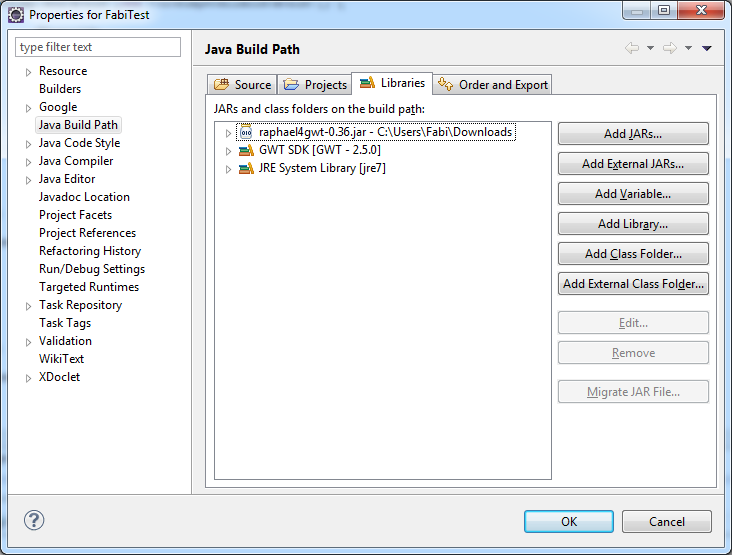
1) rigth clik on the
project/build path/configure build path, and in the libraries click
on external jar, choose your raphael4gwt.jar, and this will look like
it :
Next step is to convert
your application for make disappear server side call. For it you need
to delete the shared and server from your generated code and from the
src/yourapp,gwt.xml,
It is done !
Now try raphael4gwt :
//create a raphael
paper at 0,0 screen coords
and size 300x300
Paper paper = Raphael.paper(0, 0, 300, 300);
//draw a red rounded
rectangle
Shape rect1 = paper.rect(20, 10, 22, 25, 2).
attr(new
Attr().fill("red"));
At
end of your java source, enjoy !!!!!
Next
time we will see how to make it work on device like iPhone and
Android.
Inscription à :
Articles (Atom)